Aetna Better Health - Medicaid
- 3.2
- Rating
- 100.00K
- Installs
- Free
- Price

 Analysis by App-foxy
I approach health insurance apps with more caution than I would bring to a weather app or a casual game. They can sit close to personal information, appointments, coverage questions, and stressful decisions, so convenience only matters if the app also feels understandable and manageable. Aetna Better Health - Medicaid is aimed at members who want mobile access to everyday healthcare tools from Aetna Inc, rather than another general medical reference app. In my experience, that focus makes it more useful for handling plan-related tasks than for learning about symptoms or replacing professional care.
The app is free, carries an Everyone age rating, and has been available since February 11, 2015. Its current version is 8.6, with support beginning at iOS or Android system version 8.1, depending on the device platform. Those details make it accessible to people using older phones, although compatibility alone does not tell me whether every screen will feel equally smooth on every supported device. The important point is that this is a member-service tool: I would install it to manage access to health-plan resources, not to use it as a diagnosis engine.
What I looked for before trusting it with health-plan tasks
The developer is Aetna Inc, which gives the app a clear connection to the Aetna Better Health service rather than making it look like an unrelated third-party utility. That identity matters when I am deciding where to sign in or where to look for plan information. Still, a recognizable developer is only the first part of trust. I also want to know what the app asks me to do, which choices are visible, and whether I can stop before sharing information I did not intend to provide.
You May Also Like

 Blood Strike: 2.5 Anniversary
Blood Strike’s Loadouts Turn Every Drop Into a Tactical Gamble
A close look at Blood Strike’s custom loadouts: how fast access to signature weapons reshapes its battle royale rhythm, rewards preparation, and narrows the gap between fights.

 Pandora - Music & Podcasts
Pandora’s Music Is Easy to Start, but Harder to Recover
Pandora’s strength is its low-effort path from a seed to a station. Its weak spot is how much confidence it asks you to place in connection, setup, and quiet recovery.

 8 Ball Pool
 Is Built on Rivalries, Rematches, and Routine
A close look at the rivalries, rematches, shared routines, and unanswered safety questions that turn a quick pool match into a persistent mobile community.

 Samsung Music
’s Quiet Strength Is Playing What You Already Own
Its reach comes less from spectacle than from dependable access to a personal library. That simplicity is both the app’s strongest retention engine and its ceiling.

 AccuWeather: Weather Radar
AccuWeather Review: A Quick, Clear Forecast for Everyday Decisions
For everyday plans, the best forecast is the one you can understand quickly. AccuWeather makes rain timing, radar, and local conditions easy to act on, with a few trade-offs.

 Hill Climb Racing
Why Hill Climb Racing Still Turns Crashes Into One More Run
A tiny car, a bumpy hill and one more upgrade: Hill Climb Racing keeps resurfacing because its simple chaos makes every near-miss feel personal.
More From Our News Desk



The public response is mixed rather than universally enthusiastic. The app has an average rating of 3.3 from around 672 ratings, alongside roughly 349 written reviews. I read that kind of result as a reason to test the practical workflow carefully instead of assuming that the app will be effortless. A middling rating can reflect login friction, device differences, confusing navigation, or expectations that are not met by a plan-specific tool. It does not automatically prove that the app is unsafe, but it does encourage a more deliberate first session.
That first session is where I would establish whether the app suits my situation. I would confirm that the plan name and member context shown during setup match my coverage, use the official app-store entry rather than an unfamiliar download source, and avoid entering information while connected to a public network. These are simple precautions, but they are especially sensible for a medical app. Convenience should not encourage rushed sign-ins or casual sharing from a borrowed phone.
I also keep the app’s role in perspective. Aetna Better Health - Medicaid is not something I would rely on for an emergency, a diagnosis, or a decision that needs immediate clinical judgment. If I had severe symptoms, I would use emergency services or contact a qualified healthcare professional. If I needed a detailed explanation of a medical condition, I would use a clinician or a trusted health-information source. The app’s value is in helping me reach plan-related tools more directly.
How the app fits into an ordinary healthcare day
Imagine that I am preparing for a primary-care visit and realize I need to check a plan detail before leaving home. Instead of searching through old emails or trying to remember which phone number belongs to member services, I can open the app and look for the relevant healthcare tool. If the information I need is available through the member experience, having it in one place can reduce the small delays that often turn a routine appointment into a frustrating morning.
That scenario shows the app’s strongest practical idea: it puts popular health-care tools closer to the member. The benefit is not that the phone becomes a medical expert. The benefit is that I can begin with a plan-specific route instead of jumping between a general search engine, paper documents, and several unrelated websites. For Medicaid members who manage appointments, coverage questions, or other recurring administrative tasks, that central starting point can be worthwhile.
There is also a useful preparation habit here. Before I need the app urgently, I would open it at home, sign in calmly, and identify where the main tools are located. I would check whether my account details appear correctly and make a note of the normal support path if something goes wrong. This is a better workflow than waiting until I am outside a clinic or trying to solve an access problem while already stressed.
Another non-obvious trade-off is that a single app can reduce searching while also concentrating more responsibility in one account. If I lose access to that account, change phones, or share a device with another person, the convenience can become a hurdle. I would therefore keep my account recovery information current and use the device’s own screen lock. I would not leave the app open on a shared phone, especially if the screen displays member-related information.
What I can reasonably expect from the controls
The app’s purpose suggests a member-facing doorway to health-care tools, but I do not treat that as permission to assume every possible insurance feature is present. The useful test is visible control: can I tell what action I am taking, why I am taking it, and whether the app gives me a clear way to return or cancel? When a screen asks for sensitive details, I slow down and read the labels instead of tapping through automatically.
I would pay particular attention to account controls. A trustworthy experience should make it possible to recognize the signed-in member context and to leave the account safely when finished. On a personal phone, staying signed in may be convenient; on a family tablet, workplace phone, or borrowed device, it may be the wrong choice. I would make that decision based on who can access the device, not simply on how many seconds a future login might save.
Notifications deserve the same care. If the app offers notification choices, I would review them rather than enabling everything by habit. A reminder can be helpful, but a message that reveals plan or care-related context on a lock screen may be too visible for some households. I prefer notifications that tell me an action needs attention without exposing unnecessary details in public.
Privacy choices are also most useful when they are understandable at the moment they appear. I look for plain explanations, identifiable buttons, and a way to revisit a decision later. I do not assume that installing a medical app means I must accept every optional setting. If a permission or account request does not make sense for the task I am trying to complete, I would pause and seek clarification through the plan’s established support channel.
Where sensitive moments need extra attention
Health-plan apps can feel routine until a screen involves identity, coverage, a provider, or a personal care situation. That is when I become more careful. I check the recipient before submitting anything, review names and dates, and avoid using autofill blindly. A small mistake in a medical-administrative workflow can create more work later, even when the app itself is functioning normally.
I would also avoid taking screenshots of member information unless I had a specific reason and a safe place to store them. Screenshots can appear in photo backups, shared galleries, or recent-image pickers. The same caution applies to copying details into messaging apps. If I need to show a screen to a family member or caregiver, I would first consider whether the visible information is necessary and whether I can hide unrelated personal details.
Public Wi-Fi is another moment where I would choose caution over speed. A clinic’s guest network may be convenient, but I would rather complete account work over a trusted connection when possible. If I must use a shared network, I would avoid leaving the session open afterward and would confirm that I have signed out or closed the app appropriately. These habits are not unique to Aetna Better Health - Medicaid, but they matter more when the app is connected to health-plan information.
Caregivers may find the app useful, but shared access needs a clear boundary. If I were helping a parent, child, or another family member, I would not assume that my own phone should hold their account indefinitely. I would ask what access they actually want me to have, avoid saving their credentials in a way that removes their control, and use the member’s own support route when an account or coverage question needs an official answer.
There is a practical distinction between information access and medical advice. If the app helps me reach a plan tool, that does not mean the result settles a clinical question. I would still verify important details with the appropriate healthcare professional or member-service representative when the consequence of misunderstanding is high. The app can shorten the path to information, but I remain responsible for recognizing when a human explanation is needed.
Who gets the most value from this app
I see the clearest fit for people enrolled in Aetna Better Health Medicaid who regularly need a mobile starting point for health-care tools. It may be especially helpful for someone who dislikes keeping paper documents, frequently checks plan-related details, or wants to begin an administrative task away from a desktop computer. The free price removes one obvious barrier, and the Everyone rating makes the app broadly approachable from an age-label perspective.
It can also suit a member who is comfortable with basic account management and prefers self-service. Opening an app can feel less intimidating than searching a large website, particularly when the goal is simply to locate a familiar plan resource. I would recommend trying it during a low-pressure moment first, then deciding whether it genuinely saves time compared with the browser or telephone alternatives.
I would be more hesitant to recommend it as the only option for someone who struggles with passwords, has unreliable internet access, or needs frequent personal guidance. A mobile interface cannot replace a person who can explain a complicated eligibility or coverage issue. For those situations, the usual member-service phone route or an in-person conversation may be better, even if it takes longer.
I would also skip it if I were looking for broad wellness coaching, symptom checking, medication education, or a complete personal health-record replacement. Those are different categories of need. A general medical reference app may be better for basic educational reading, while a clinician’s portal may be better for clinical records and direct care communication. The right comparison depends on the task, not on which app has the most features.
How it compares with websites, phone support, and clinical portals
Compared with a normal browser, a dedicated app can make repeated access feel more direct. I do not need to begin with a search query and sort through unrelated results. The trade-off is that the app occupies storage, requires updates, and may be less comfortable when I need to read a long explanation or manage several pieces of information at once. For occasional use, the mobile website may be enough; for recurring member tasks, the app may feel more convenient.
Compared with phone support, the app offers more independence but less conversational help. I can explore at my own pace, yet I may spend longer interpreting a screen when the issue is unusual. Phone support is often the better choice when a decision depends on personal circumstances, when information appears inconsistent, or when I need confirmation that an action was completed.
Compared with a clinical portal, this app belongs closer to the health-plan side of the experience. A clinical portal is generally the place I would expect to look for provider-facing care information, while Aetna Better Health - Medicaid is intended to connect members with plan-related tools. Using the wrong platform for the wrong question is a common source of frustration, so I would first identify whether my question concerns my coverage and member services or my treatment and medical record.
One useful workflow is to use the app as the first stop, not the final authority for every issue. I can check whether the relevant tool is available, gather the basic information I need, and then move to phone support or a healthcare professional if the situation requires interpretation. That approach preserves the app’s convenience without asking it to do a job it was not designed to do.
My cautious verdict after weighing convenience and control
The strongest reason to try Aetna Better Health - Medicaid is focused access, not novelty. It gives Aetna Better Health Medicaid members a free mobile route to popular health-care tools, and that can be genuinely useful when I need to start a plan task quickly. The app’s long availability, current version 8.6, and support for devices beginning with system version 8.1 also make it a practical candidate for people who are not using the newest phone.
My recommendation comes with a clear condition: use it deliberately. I would verify the account context, review visible choices, limit notifications on shared devices, protect the phone with a lock, and avoid treating the app as a substitute for urgent care or human explanations. I would also keep an alternative available, whether that is the browser, member-service phone support, or a clinical portal, because no single route is ideal for every healthcare question.
The 3.3 average tells me to keep expectations realistic. Some members may find the app convenient, while others may encounter access or navigation friction that makes another option preferable. I would install it if I were an Aetna Better Health Medicaid member who values self-service and has a reasonably dependable connection. I would not make it my only way to manage care. Used as one controlled doorway into plan resources, it is worth trying; used as a replacement for support, judgment, or medical advice, it is not.
FAQs for Aetna Better Health - Medicaid
01What features does the Aetna Better Health - Medicaid app offer?
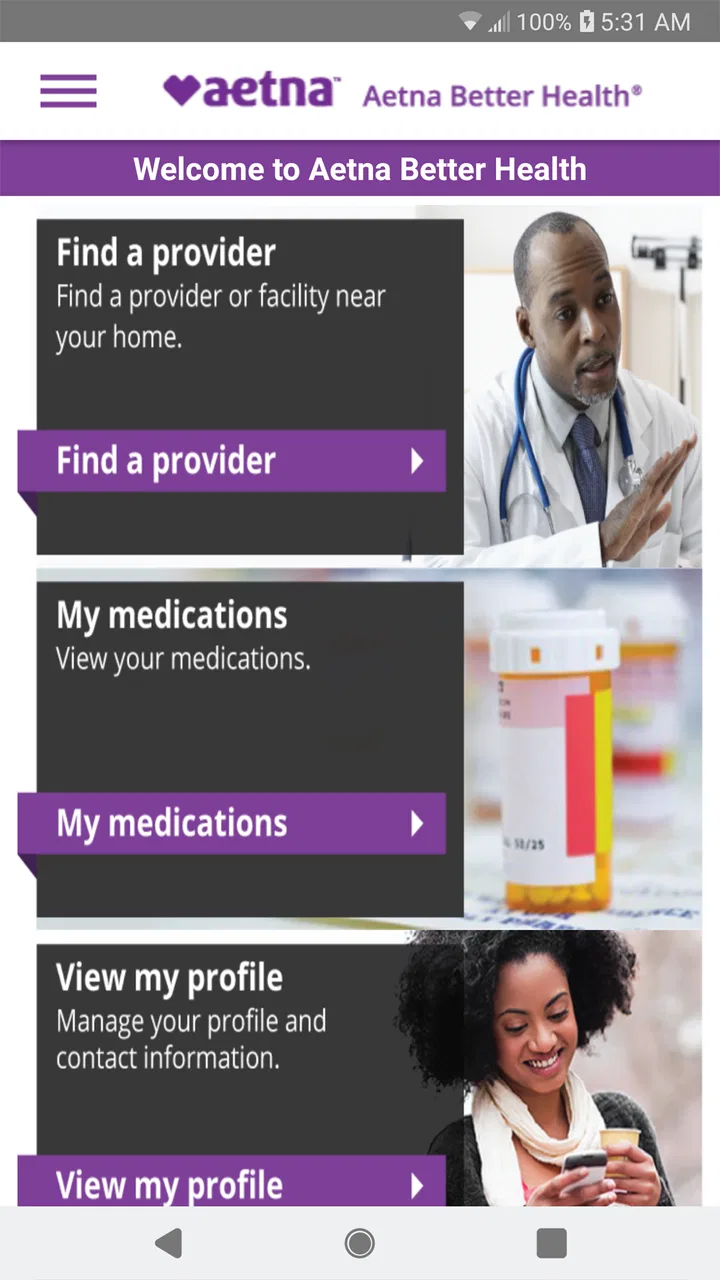
The Aetna Better Health - Medicaid app provides users with access to their healthcare plan information, including benefits details, claims tracking, and provider search. It also offers features like digital ID cards, appointment reminders, and prescription management, making it easier for users to manage their healthcare on the go.
02Is the Aetna Better Health - Medicaid app secure?
Yes, the app employs robust security measures to protect user data. It uses encryption and secure login protocols to ensure that personal health information remains confidential. Users should also utilize strong passwords and enable any additional security features offered by their device to enhance protection.
03How can I find a healthcare provider using the app?
The app includes a provider search feature that allows users to find doctors, specialists, and facilities within their network. Users can search by location, specialty, or provider name, and view detailed profiles, including contact information and patient reviews, to make informed choices about their healthcare providers.
04Can I manage my prescriptions through the app?
Yes, the Aetna Better Health - Medicaid app allows users to manage their prescriptions. You can view current prescriptions, check refill status, and set up reminders for medication. This feature helps ensure adherence to prescribed treatments and makes medication management more convenient.
05What should I do if I encounter issues with the app?
If you experience any issues with the app, there is a customer support section within the app that provides troubleshooting tips and contact information for technical support. Users can also visit the Aetna website for additional resources or contact their customer service hotline for personalized assistance.
Pros
- User-friendly interface for easy navigation.
- Comprehensive health resources available.
- Real-time updates on claims and coverage.
- Supports multiple languages for accessibility.
- Secure login with biometric options.
Cons
- Limited offline functionality.
- Occasional slow loading times.
- In-app support response can be delayed.
- Requires frequent updates for optimal use.
- Device compatibility issues on older models.

Aetna Better Health - Medicaid
Gallery